|
|
Thinking inside the box | |||||
|
Bio
Code Papers Talks Linux Quantian About Blog
|
Introducing the BH package
As that post notes, BH is still pretty new and rough, and we probably missed some other useful Boost packages. If so, let one of us know. /code/snippets | permanent link Sat, 08 Dec 2012
Rcpp attributes: Even easier integration of GSL code into R
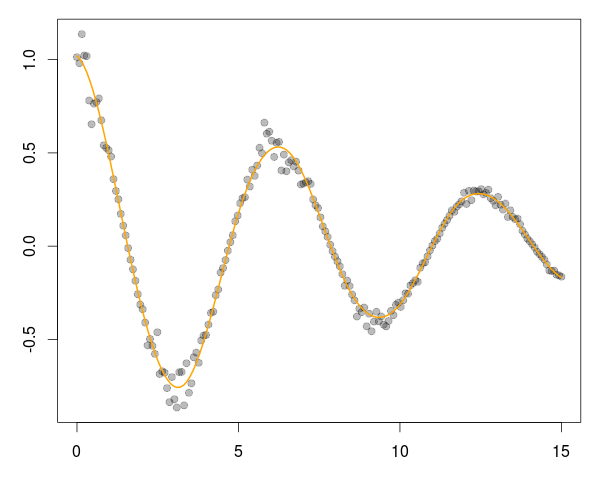
One key aspect is the use of the plugins for the inline package. They provide something akin to a callback mechanism so that compilation and linking steps can be informed about header and library locations and names. We are going to illustrate this with an example from GNU Scientific Library (GSL). The example I picked uses B-Spline estimation from the GSL. This is a little redundant as R has its own spline routines and package, but serves well as a simple illustration---and, by reproducing an existing example, followed an established path. So we will look at Section 39.7 of the GSL manual which has a complete example as a standalone C program, generating both the data and the fit via cubic B-splines. We can decompose this two parts: data generation, and fitting. We will provide one function each, and then use both from R. These two function will follow the aforementioned example from Section 39.7 somewhat closely. We start with the first function to generate the data.
We include a few header files, define (in what is common for C programs) a few constants and then define a single function// [[Rcpp::depends(RcppGSL)]] #include <RcppGSL.h> #include <gsl/gsl_bspline.h> #include <gsl/gsl_multifit.h> #include <gsl/gsl_rng.h> #include <gsl/gsl_randist.h> #include <gsl/gsl_statistics.h> const int N = 200; // number of data points to fit const int NCOEFFS = 12; // number of fit coefficients */ const int NBREAK = (NCOEFFS - 2); // nbreak = ncoeffs + 2 - k = ncoeffs - 2 since k = 4 */ // [[Rcpp::export]] Rcpp::List genData() { const size_t n = N; size_t i; double dy; gsl_rng *r; RcppGSL::vector<double> w(n), x(n), y(n); gsl_rng_env_setup(); r = gsl_rng_alloc(gsl_rng_default); //printf("#m=0,S=0\n"); /* this is the data to be fitted */ for (i = 0; i < n; ++i) { double sigma; double xi = (15.0 / (N - 1)) * i; double yi = cos(xi) * exp(-0.1 * xi); sigma = 0.1 * yi; dy = gsl_ran_gaussian(r, sigma); yi += dy; gsl_vector_set(x, i, xi); gsl_vector_set(y, i, yi); gsl_vector_set(w, i, 1.0 / (sigma * sigma)); //printf("%f %f\n", xi, yi); } Rcpp::DataFrame res = Rcpp::DataFrame::create(Rcpp::Named("x") = x, Rcpp::Named("y") = y, Rcpp::Named("w") = w); x.free(); y.free(); w.free(); gsl_rng_free(r); return(res); } genData() which returns and Rcpp::List as a list object to R. A primary importance here are the two attributes:
one to declare a dependence on the RcppGSL package, and one to declare the
export of the data generator function. That is all it takes! The plugin of the
RcppGSL will provide information about the headers and library, and Rcpp
Attributes will do the rest.
The core of the function is fairly self-explanatory, and closely follows the
original example. Space gets
allocated, the RNG is setup and a simple functional form generates some data plus noise (see below). In the original, the data is written to
the standard output; here we return it to R as three columns in a Next, we can turn the fitting function.
// [[Rcpp::export]] Rcpp::List fitData(Rcpp::DataFrame ds) { const size_t ncoeffs = NCOEFFS; const size_t nbreak = NBREAK; const size_t n = N; size_t i, j; Rcpp::DataFrame D(ds); // construct the data.frame object RcppGSL::vector<double> y = D["y"]; // access columns by name, RcppGSL::vector<double> x = D["x"]; // assigning to GSL vectors RcppGSL::vector<double> w = D["w"]; gsl_bspline_workspace *bw; gsl_vector *B; gsl_vector *c; gsl_matrix *X, *cov; gsl_multifit_linear_workspace *mw; double chisq, Rsq, dof, tss; bw = gsl_bspline_alloc(4, nbreak); // allocate a cubic bspline workspace (k = 4) B = gsl_vector_alloc(ncoeffs); X = gsl_matrix_alloc(n, ncoeffs); c = gsl_vector_alloc(ncoeffs); cov = gsl_matrix_alloc(ncoeffs, ncoeffs); mw = gsl_multifit_linear_alloc(n, ncoeffs); gsl_bspline_knots_uniform(0.0, 15.0, bw); // use uniform breakpoints on [0, 15] for (i = 0; i < n; ++i) { // construct the fit matrix X double xi = gsl_vector_get(x, i); gsl_bspline_eval(xi, B, bw); // compute B_j(xi) for all j for (j = 0; j < ncoeffs; ++j) { // fill in row i of X double Bj = gsl_vector_get(B, j); gsl_matrix_set(X, i, j, Bj); } } gsl_multifit_wlinear(X, w, y, c, cov, &chisq, mw); // do the fit dof = n - ncoeffs; tss = gsl_stats_wtss(w->data, 1, y->data, 1, y->size); Rsq = 1.0 - chisq / tss; Rcpp::NumericVector FX(151), FY(151); // output the smoothed curve double xi, yi, yerr; for (xi = 0.0, i=0; xi < 15.0; xi += 0.1, i++) { gsl_bspline_eval(xi, B, bw); gsl_multifit_linear_est(B, c, cov, &yi, &yerr); FX[i] = xi; FY[i] = yi; } Rcpp::List res = Rcpp::List::create(Rcpp::Named("X")=FX, Rcpp::Named("Y")=FY, Rcpp::Named("chisqdof")=Rcpp::wrap(chisq/dof), Rcpp::Named("rsq")=Rcpp::wrap(Rsq)); gsl_bspline_free(bw); gsl_vector_free(B); gsl_matrix_free(X); gsl_vector_free(c); gsl_matrix_free(cov); gsl_multifit_linear_free(mw); y.free(); x.free(); w.free(); return(res); } The second function closely follows the second part of the GSL example and, given the input data, fits the output data. Data structures are setup, the spline basis is created, data is fit and then the fit is evaluated at a number of points. These two vectors are returned along with two goodness of fit measures. We only need to load the Rcpp package and source a file containing the two snippets shown above, and we are ready to deploy this: library(Rcpp) sourceCpp("bSpline.cpp") # compile two functions dat <- genData() # generate the data fit <- fitData(dat) # fit the model, returns matrix and gof measures And with that, we generate a chart such as
via a simple four lines, or as much as it took to create the C++ functions, generate the data and fit it! op <- par(mar=c(3,3,1,1)) plot(dat[,"x"], dat[,"y"], pch=19, col="#00000044") lines(fit[[1]], fit[[2]], col="orange", lwd=2) par(op) The RcppArmadillo and RcppEigen package support plugin use in the same way. Add an attribute to export a function, and an attribute for the depends -- and you're done. Extending R with (potentially much faster) C++ code has never been easier, and opens a whole new set of doors. /code/snippets | permanent link Tue, 20 Nov 2012
Rcpp attributes: A simple example 'making pi'
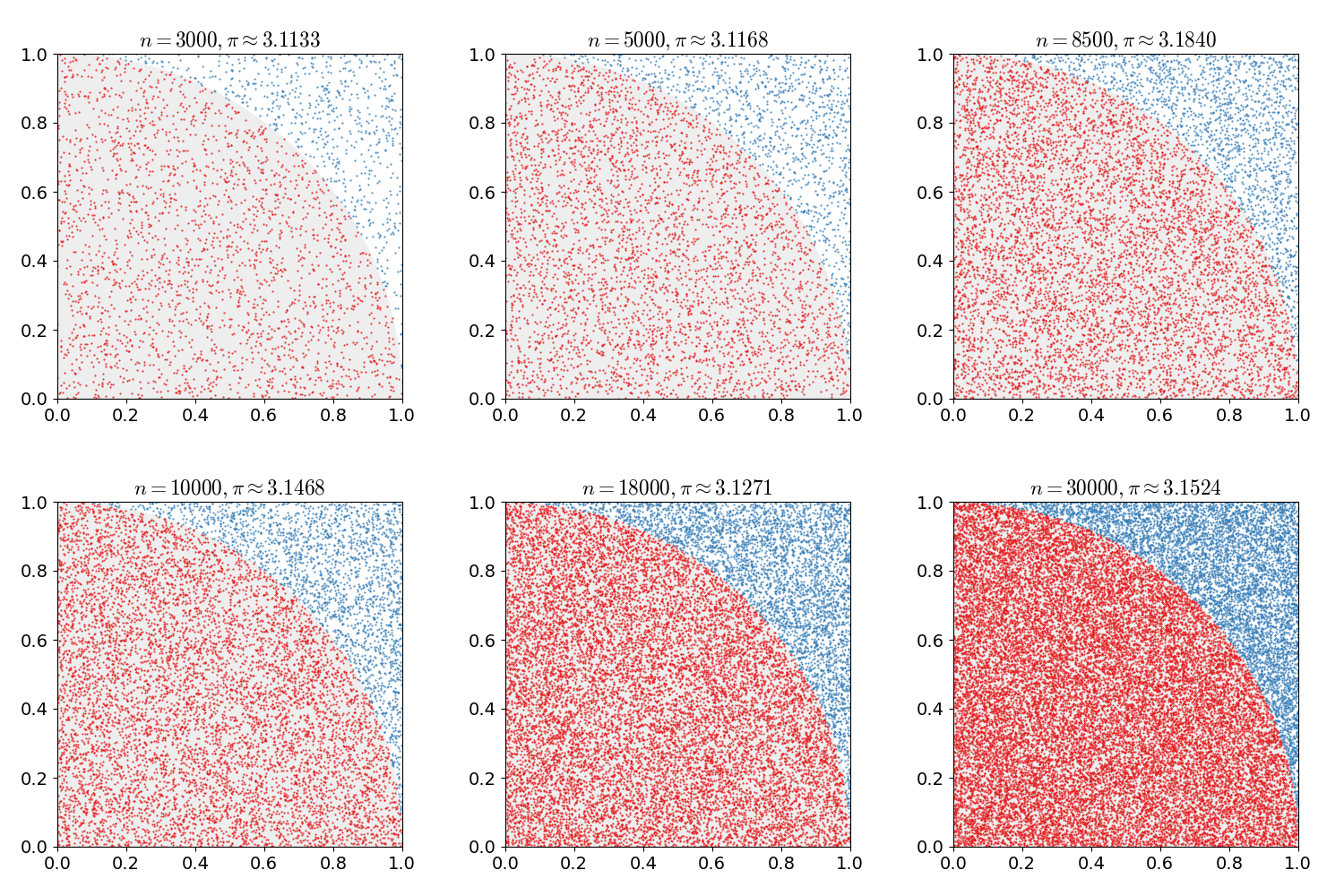
But because few things beat a nice example, this post tries to build some more excitement. We will illustrate how Rcpp attributes makes it really easy to add C++ code to R session, and that that code is as easy to grasp as R code.
Our motivating example is everybody's favourite introduction to Monte Carlo simulation: estimating π. A common method uses the fact
the unit circle has a surface area equal to π. We draw two uniform random numbers
Now, a vectorized version (drawing
piR <- function(N) { x <- runif(N) y <- runif(N) d <- sqrt(x^2 + y^2) return(4 * sum(d < 1.0) / N) } And in C++ we can write almost exactly the same function thanks the Rcpp sugar vectorisation available via Rcpp: Sure, there are small differences: C++ is statically typed, R is not. We need one include file for declaration, and we need one instantiation of the#include <Rcpp.h> using namespace Rcpp; // [[Rcpp::export]] double piSugar(const int N) { RNGScope scope; // ensure RNG gets set/reset NumericVector x = runif(N); NumericVector y = runif(N); NumericVector d = sqrt(x*x + y*y); return 4.0 * sum(d < 1.0) / N; } RNGScope object to ensure random number draws remain coordinated between the calling R process and the C++ function
calling into its (compiled C-code based) random number generators. That way we even get the exact same draws for the same seed.
But the basic approach is identical: draw a vector x and vector y, compute the distance to the origin and then
obtain the proportion within the unit circle -- which we scale by four. Same idea, same vectorised implementation in C++.
But the real key here is the one short line with the
The full example (which assumes the C++ file is saved as and it does a few things: set up the R function, source the C++ function (and presto: we have a callable C++ function just like that), compute two simulations given the same seed and ensure they are in fact identical -- and proceed to compare the timing in a benchmarking exercise. That last aspect is not even that important -- we end up being almost-but-not-quite twice as fast on my machine for different values of#!/usr/bin/r library(Rcpp) library(rbenchmark) piR <- function(N) { x <- runif(N) y <- runif(N) d <- sqrt(x^2 + y^2) return(4 * sum(d < 1.0) / N) } sourceCpp("piSugar.cpp") N <- 1e6 set.seed(42) resR <- piR(N) set.seed(42) resCpp <- piSugar(N) ## important: check results are identical with RNG seeded stopifnot(identical(resR, resCpp)) res <- benchmark(piR(N), piSugar(N), order="relative") print(res[,1:4]) N.
The real takeaway here is the ease with which we can get a C++ function into R --- and the new process completely takes care of passing parameters in, results out, and does the compilation, linking and loading. More details about Rcpp attributes are in the new vignette. Now enjoy the π. Update:One somewhat bad typo fixed. Update:Corrected one background tag. /code/snippets | permanent link Wed, 14 Nov 2012
Rcpp and the new R:: namespace for Rmath.h
R, as a statistical language and environment, has very well written and tested statistical distribution functions providing
probability density, cumulative distribution, quantiles and random number draws for dozens of common and not so common distribution functions.
This code is used inside R, and available for use from standalone C or C++ programs via the standalone R math library which Debian /
Ubuntu have as a package
User sometimes write code against this interface, and then want to combine the code with other code, possibly even with Rcpp. We allowed
for this, but it required a bit of an ugly interface. R provides a C interface; these have no namespaces. Identifiers can clash, and to be
safe one can enable a generic prefix
So one of the things we added was another layer of indirection by adding a
The short example below shows this for a simple function taking a vector, and returning its This example also uses the new Rcpp attributes described briefly in the announcement blog post and of course in more detail in the corresponding vignette. Let us just state here that we simply provide a complete C++ function, using standard Rcpp types -- along with one 'attribute' declaration of an export via Rcpp. That's it -- even easier than using inline.#include <Rcpp.h> // [[Rcpp::export]] Rcpp::DataFrame mypnorm(Rcpp::NumericVector x) { int n = x.size(); Rcpp::NumericVector y1(n), y2(n), y3(n); for (int i=0; i<n; i++) { // the way we used to do this y1[i] = ::Rf_pnorm5(x[i], 0.0, 1.0, 1, 0); // the way we can do it now y2[i] = R::pnorm(x[i], 0.0, 1.0, 1, 0); } // or using Rcpp sugar in one go y3 = Rcpp::pnorm(x); return Rcpp::DataFrame::create(Rcpp::Named("Rold") = y1, Rcpp::Named("Rnew") = y2, Rcpp::Named("sugar") = y3); } Now in R we simply do to obtain a callable R function with the C++ code just shown behind it. No Makefile, no command-line tool invocation -- nothing but a single call toR> sourceCpp("mypnorm.cpp") sourceCpp() which takes care of things --- and brings us a compiled C++ function to R just given the source file with
its attribute declaration.
We can now use the new function to compute the probaility distribution both the old way, the new way with the 'cleaner'
This example hopefully helped to illustrate how Rcpp 0.10.0 brings both something really powerful (Rcpp attributes -- more on this another time, hopefully) and convenient in the new namespace for statistical functions.R> x <- seq(0, 1, length=1e3) R> res <- mypnorm(x) R> head(res) Rold Rnew sugar 1 0.500000 0.500000 0.500000 2 0.500399 0.500399 0.500399 3 0.500799 0.500799 0.500799 4 0.501198 0.501198 0.501198 5 0.501597 0.501597 0.501597 6 0.501997 0.501997 0.501997 R> all.equal(res[,1], res[,2], res[,3]) [1] TRUE R> /code/snippets | permanent link Thu, 25 Oct 2012
Accelerating R code: Computing Implied Volatilities Orders of Magnitude Faster
In this context, I have a nice new example. And for once, it is work-related. I generally cannot share too much of what we do there as this is, well, proprietary, but I have this nice new example. The other day, I was constructing (large) time series of implied volatilities. Implied volatilities can be thought of as the complement to an option's price: given a price (and all other observables which can be thought of as fixed), we compute an implied volatility price (typically via the standard Black-Scholes model). Given a changed implied volatility, we infer a new price -- see this Wikipedia page for more details. In essence, it opens the door to all sorts of arbitrage and relative value pricing adventures. Now, we observe prices fairly frequently to create somewhat sizeable time series of option prices. And each price corresponds to one matching implied volatility, and for each such price we have to solve a small and straightforward optimization problem: to compute the implied volatility given the price. This is usually done with an iterative root finder. The problem comes from the fact that we have to do this (i) over and over and over for large data sets, and (ii) that there are a number of callbacks from the (generic) solver to the (standard) option pricer.
So our first approach was to just call the corresponding function R> GBSVolatility function (price, TypeFlag = c("c", "p"), S, X, Time, r, b, tol = .Machine$double.eps, maxiter = 10000) { TypeFlag = TypeFlag[1] volatility = uniroot(.fGBSVolatility, interval = c(-10, 10), price = price, TypeFlag = TypeFlag, S = S, X = X, Time = Time, r = r, b = b, tol = tol, maxiter = maxiter)$root volatility } <environment: namespace:fOptions> R> R> .fGBSVolatility function (x, price, TypeFlag, S, X, Time, r, b, ...) { GBS = GBSOption(TypeFlag = TypeFlag, S = S, X = X, Time = Time, r = r, b = b, sigma = x)@price price - GBS } <environment: namespace:fOptions> So the next idea was to try the corresponding function from my RQuantLib package which brings (parts of) QuantLib to R. That was seen as been lots faster already. Now, QuantLib is pretty big and so is RQuantLib, and we felt it may not make sense to install it on a number of machines just for this simple problem. So one evening this week I noodled around for an hour or two and combined (i) a basic Black/Scholes calculation and (ii) a standard univariate zero finder (both of which can be found or described in numerous places) to minimize the difference between the observed price and the price given an implied volatility. With about one hundred lines in C++, I had something which felt fast enough. So today I hooked this into R via a two-line wrapper in quickly-created package using Rcpp.
I had one more advantage here. For our time series problem, the majority of the parameters (strike, time to maturity, rate, ...) are fixed, so we can
structure the problem to be vectorised right from the start. I cannot share the code or more the details of my new implementation. However, both
Anyway, here is the result, courtesy of a quick run via the rbenchmark package. We create a vector of length 500; the implied volatility computation will be performed at each point (and yes, our time series are much longer indeed). This is replicated 100 times (as is the default for rbenchmark) for each of the three approaches:
The new local solution is denoted by zzz(X). It is already orders of magnitude faster than the RQL(x) function using
RQuantLib (which is, I presume, due to my custom solution internalising the loop). And
the new approach is a laughable amount faster than the basic approach (shown as fOp) via
fOptions. For one hundred replications of solving implied volatilities for
all elements of a vector of size 500, the slow solution takes about 7.5 minutes --- while the fast solution takes 38 milliseconds. Which comes to a
relative gain of over 11,000.
So sitting down with your C++ compiler to craft a quick one-hundred lines, combining two well-known and tested methods, can reap sizeable benefits. And Rcpp makes it trivial to call this from R. /code/snippets | permanent link Sun, 02 Sep 2012
Faster creation of binomial matrices
The post also fell short of a good aggregated timing comparison for which we love the rbenchmark package. So in order to rectify this, and to see what we can do here with Rcpp, a quick post revisiting the issue. As preliminaries, we need to load three packages: inline to create compiled code on the fly (which, I should mention, is also used together with Rcpp by the Stan / RStan MCMC sampler which is creating some buzz this week), the compiler package included with R to create byte-compiled code and lastly the aforementioned rbenchmark package to do the timings. We also set row and column dimension, and set them a little higher than the original example to actually have something measurable: The first suggestion was the one by Scott himself. We will wrap this one, and all the following ones, in a function so that all approaches are comparable as being in a function of two dimension arguments:library(inline) library(compiler) library(rbenchmark) n <- 500 k <- 100 We also immediatly compute a byte-compiled version (just because we now can) to see if this helps at all with the code. As there are no (explicit !) loops, we do not expect a big pickup. Scott's function works, but sweeps thescott <- function(N, K) { mm <- matrix(0, N, K) apply(mm, c(1, 2), function(x) sample(c(0, 1), 1)) } scottComp <- cmpfun(scott) sample() function across all rows and columns which is probably going to be (relatively) expensive.
Next is the first improvement suggested to Scott which came from Ted Hart. This is quite a bit smarter as it vectorises the approach, generating N times K elements at once which are then reshaped into a matrix.ted <- function(N, K) { matrix(rbinom(N * K, 1, 0.5), ncol = K, nrow = N) } Another suggestion came from David Smith as well as Rafael Maia. We rewrite it slightly to make it a function with two arguments for the desired dimensions: This is very clever as it usesdavid <- function(m, n) { matrix(sample(0:1, m * n, replace = TRUE), m, n) } sample() over zero and one rather than making (expensive) draws from random
number generator.
Next we have a version from Luis Apiolaza: It draws from a random uniform and rounds to zero and one, rather than deploying the binomial.luis <- function(m, n) { round(matrix(runif(m * n), m, n)) } Then we have the version using RcppArmadillo hinted at by Scott, but with actual arguments and a correction for row/column dimensions. Thanks to inline we can write the C++ code as an R character string; inline takes care of everything and we end up with C++-based solution directly callable from R: This works, and is pretty fast. The only problem is that it answers the wrong question as it returns U(0,1) draws and not binomials. We need to truncate or round. So a corrected version isarma <- cxxfunction(signature(ns="integer", ks="integer"), plugin = "RcppArmadillo", body=' int n = Rcpp::as<int>(ns); int k = Rcpp::as<int>(ks); return wrap(arma::randu(n, k)); ') which uses the the old rounding approximation of adding 1/2 before truncating.armaFloor <- cxxfunction(signature(ns="integer", ks="integer"), plugin = "RcppArmadillo", body=' int n = Rcpp::as<int>(ns); int k = Rcpp::as<int>(ks); return wrap(arma::floor(arma::randu(n, k) + 0.5)); ') With Armadillo in the picture, we do wonder how Rcpp sugar would do. Rcpp sugar, described in one of the eight vignettes of the Rcpp package, is using template meta-programming to provide R-like expressiveness (aka "syntactic sugar") at the C++ level. In particular, it gives access to R's RNG functions using the exact same RNGs as R making the results directly substitutable (whereas Armadillo uses its own RNG). Heresugar <- cxxfunction(signature(ns="integer", ks="integer"), plugin = "Rcpp", body=' int n = Rcpp::as<int>(ns); int k = Rcpp::as<int>(ks); Rcpp::RNGScope tmp; Rcpp::NumericVector draws = Rcpp::runif(n*k); return Rcpp::NumericMatrix(n, k, draws.begin()); ') Rcpp::RNGScope deals with setting/resetting the R RNG state. This draws a vector of N time K uniforms
similar to Luis' function -- and just like Luis' R function does so without looping -- and then shapes a matrix of dimension N by K from it.
And it does of course have the same problem as the RcppArmadillo approach earlier and we can use the same solution: sugarFloor <- cxxfunction(signature(ns="integer", ks="integer"), plugin = "Rcpp", body=' int n = Rcpp::as<int>(ns); int k = Rcpp::as<int>(ks); Rcpp::RNGScope tmp; Rcpp::NumericVector draws = Rcpp::floor(Rcpp::runif(n*k)+0.5); return Rcpp::NumericMatrix(n, k, draws.begin()); ') Now that we have all the pieces in place, we can compare: With all the above code example in a small R script we call via littler, we getres <- benchmark(scott(n, k), scottComp(n,k), ted(n, k), david(n, k), luis(n, k), arma(n, k), sugar(n,k), armaFloor(n, k), sugarFloor(n, k), order="relative", replications=100) print(res[,1:4]) We can see several takeaways:edd@max:~/svn/rcpp/pkg$ r /tmp/scott.r Loading required package: methods test replications elapsed relative 7 sugar(n, k) 100 0.072 1.000000 9 sugarFloor(n, k) 100 0.088 1.222222 6 arma(n, k) 100 0.126 1.750000 4 david(n, k) 100 0.136 1.888889 8 armaFloor(n, k) 100 0.138 1.916667 3 ted(n, k) 100 0.384 5.333333 5 luis(n, k) 100 0.410 5.694444 1 scott(n, k) 100 33.045 458.958333 2 scottComp(n, k) 100 33.767 468.986111
rbinom() Rcpp sugar
function, or implementing sample() at the C++ level is, as the saying goes, left as an exercise to the reader.
/code/snippets | permanent link Thu, 16 Aug 2012
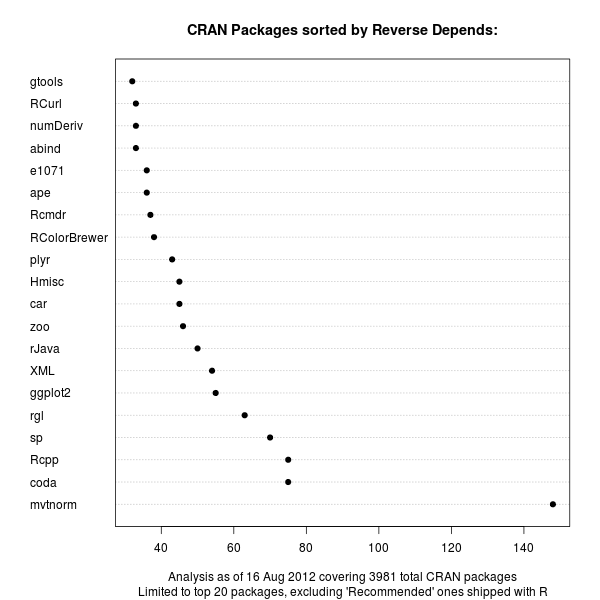
Follow-up to Counting CRAN Package Depends, Imports and LinkingTo
So here is an updated version, where we limit the display to the top twenty packages counted by reverse 'Depends:', and excluding those already shipping with R such as MASS, lattice, survival, Matrix, or nlme.
The mvtnorm package is still out by a wide margin, but we can note that (cough, cough) our Rcpp package for seamless R and C++ is now tied for second with the coda package for MCMC analysis. Also of note is the fact that CRAN keeps growing relentlessly and moved from 3969 packages to 3981 packages in the space of these few days...
Lastly, I have been asked about the code and/or data behind this. It is
really pretty simply as the main #!/usr/bin/r ## ## Initial db downloand from http://developer.r-project.org/CRAN/Scripts/depends.R and adapted require("tools") ## this function is essentially the same as R Core's from the URL ## http://developer.r-project.org/CRAN/Scripts/depends.R getDB <- function() { contrib.url(getOption("repos")["CRAN"], "source") # trigger chooseCRANmirror() if required description <- sprintf("%s/web/packages/packages.rds", getOption("repos")["CRAN"]) con <- if(substring(description, 1L, 7L) == "file://") { file(description, "rb") } else { url(description, "rb") } on.exit(close(con)) db <- readRDS(gzcon(con)) rownames(db) <- db[,"Package"] db } db <- getDB() ## count packages getCounts <- function(db, col) { foo <- sapply(db[,col], function(s) { if (is.na(s)) NA else length(strsplit(s, ",")[[1]]) } ) } ## build a data.frame with the number of entries for reverse depends, reverse imports, ## reverse linkingto and reverse suggests; also keep Recommended status ddall <- data.frame(pkg=db[,1], RDepends=getCounts(db, "Reverse depends"), RImports=getCounts(db, "Reverse imports"), RLinkingTo=getCounts(db, "Reverse linking to"), RSuggests=getCounts(db, "Reverse suggests"), Recommended=db[,"Priority"]=="recommended" ) ## Subset to non-Recommended packages as in David Smith's follow-up post dd <- subset(ddall, is.na(ddall[,"Recommended"]) | ddall[,"Recommended"] != TRUE) labeltxt <- paste("Analysis as of", format(Sys.Date(), "%d %b %Y"), "covering", nrow(db), "total CRAN packages") cutOff <- 20 doPNG <- TRUE if (doPNG) png("/tmp/CRAN_ReverseDepends.png", width=600, heigh=600) z <- dd[head(order(dd[,2], decreasing=TRUE), cutOff),c(1,2)] dotchart(z[,2], labels=z[,1], cex=1, pch=19, main="CRAN Packages sorted by Reverse Depends:", sub=paste("Limited to top", cutOff, "packages, excluding 'Recommended' ones shipped with R"), xlab=labeltxt) if (doPNG) dev.off() if (doPNG) png("/tmp/CRAN_ReverseImports.png", width=600, heigh=600) z <- dd[head(order(dd[,3], decreasing=TRUE), cutOff),c(1,3)] dotchart(z[,2], labels=z[,1], cex=1, pch=19, main="CRAN Packages sorted by Reverse Imports:", sub=paste("Limited to top", cutOff, "packages, excluding 'Recommended' ones shipped with R"), xlab=labeltxt) if (doPNG) dev.off() # no cutOff but rather a na.omit if (doPNG) png("/tmp/CRAN_ReverseLinkingTo.png", width=600, heigh=600) z <- na.omit(dd[head(order(dd[,4], decreasing=TRUE), 30),c(1,4)]) dotchart(z[,2], labels=z[,1], pch=19, main="CRAN Packages sorted by Reverse LinkingTo:", xlab=labeltxt) if (doPNG) dev.off() /code/snippets | permanent link Sun, 05 Aug 2012
Counting CRAN Package Depends, Imports and LinkingTo
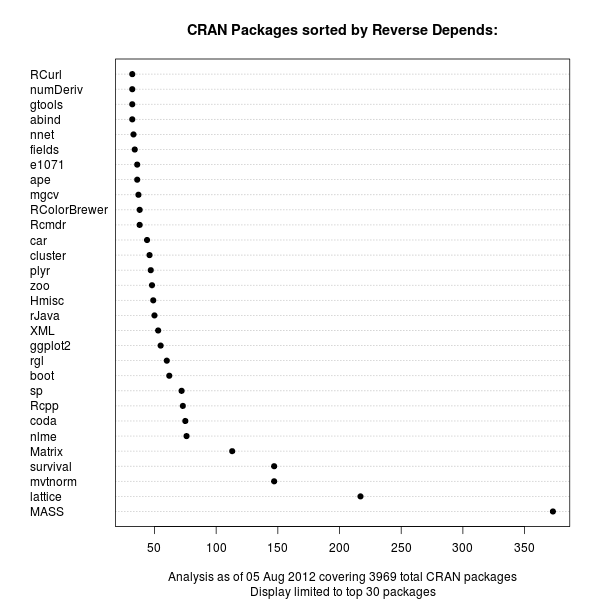
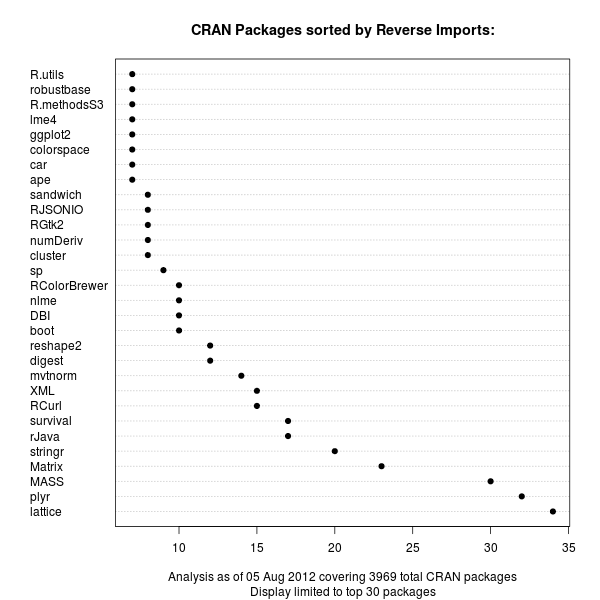
But as the question seemed deserving of a bit more analysis, I spent a few minutes on this and prepared three charts listing package in order of reverse Depends, reverse Imports and reverse LinkingTo.
First off, the reverse
Unsurprisingly, the MASS package from the classic Venables and Ripley book comes first, with Deepayan Sarkar's powerful lattice package (also covered in a book) coming second. These are both recommended packages which are commonly distributed with R itself. Next are mvtnorm and survival. Our Rcpp is up there in the top-ten, but not a frontrunner.
With the advent of namespaces a few R releases ago, it became possible to
import functions from other packages. So the
Now lattice still leads, but Hadleys's plyr package grabbed the second spot just before MASS and Matrix.
It is interesting to see that the sheer number of
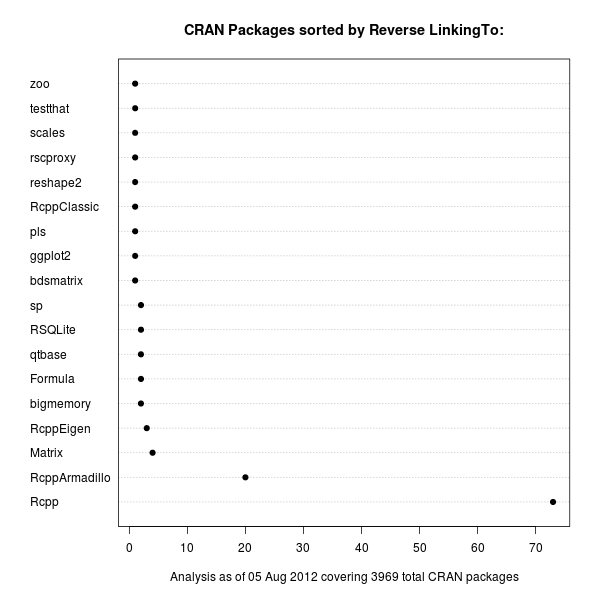
Lastly, we can also look at
One could of course take this one level further and sum up dependencies in a
recursive manner, or visualize the relationship differently. But these
/code/snippets | permanent link Tue, 10 Jul 2012
Getting numpy data into R -- Take Two
This post will show a quick example, also summarized in the short pdf vignette describing the package, and provided as a demo within the package. We first load the new package (as well as the rbenchmark package used for the benchmarking example) into R. We then create a large matrix of 100,000 rows and 50 columns. Not quite big data by any stretch, but large enough for ascii reading to be painfully slow. We also write two npy files and compress the second one.R> library(RcppCNPy) Loading required package: Rcpp R> library(rbenchmark) R> R> n <- 1e5 R> k <- 50 R> R> M <- matrix(seq(1.0, n*k, by=1.0), n, k) R> R> txtfile <- tempfile(fileext=".txt") R> write.table(M, file=txtfile) R> R> pyfile <- tempfile(fileext=".py") R> npySave(pyfile, M) R> R> pygzfile <- tempfile(fileext=".py") R> npySave(pygzfile, M) R> system(paste("gzip -9", pygzfile)) R> pygzfile <- paste(pygzfile, ".gz", sep="") R> R>
Next, we use the As shown by this example, loading a numpy file directly beats the pants off reading the data from ascii: it is about 78 times faster. Reading a compressed file is somewhat slower as the data stream has to be passed through the uncompressor provide by the zlib library. So instead of reading a binary blob in one go (once the file header has been parsed) we have to operate piecemeal---which is bound to be slower. It does however save in storage space (and users can make this tradeoff between speed and size) and is still orders of magnitude faster than parsing the ascii file. Finally, and not shown here, we unlink the temporary files.R> res <- benchmark(read.table(txtfile), + npyLoad(pyfile), + npyLoad(pygzfile), + order="relative", + columns=c("test", "replications", "elapsed", "relative"), + replications=10) R> print(res) test replications elapsed relative 2 npyLoad(pyfile) 10 1.241 1.00000 3 npyLoad(pygzfile) 10 3.098 2.49637 1 read.table(txtfile) 10 96.744 77.95649 R> Summing up, this post demonstrated how the RcppCNPy package can be a useful to access data in numpy files (which may even be compressed). Data can also be written from R to be accessed later by numpy. /code/snippets | permanent link Sat, 30 Jun 2012
Getting numpy data into R
The numpy can be read very efficiently into Python. We can do the same in R
via So the obvious next idea was to read the numpy file in Python, and to write a simple binary format. One helpful feature with this data set was that it contained only regular (rectangular) matrices of floats. So we could just store two integers for the dimensions, followed by the total data in either one large binary blob, or a sequence of column vectors. But one minor trouble was that the Intertubes lead to no easy solution to unpack the numpy format. StackOverflow had plenty of question around this topic converned with, say, how to serialize in language-independent way. But no converters. And nobody local knew how to undo the "pickle" format underlying numpy.
But a remote friend did:
Laurent,
well-known for his Rpy2
package, pointed me towards using the Finally, to round out this post, let's show the simple solution we crafted so that the next guy searching the Intertubes will have an easier. Let us start with a minimal Python program writing numpy data to disk: #!/usr/bin/env python # # simple example for creating numpy data to demonstrate converter import numpy as np # simple float array a = np.arange(15).reshape(3,5) * 1.1 outfile = "/tmp/data.npy" np.save(outfile, a) Next, the simple Python converter to create a binary file containing two integers for row and column dimension, followed by row times columns of floats: #!/usr/bin/python # # read a numpy file, and write a simple binary file containing # two integers 'n' and 'k' for rows and columns # n times k floats with the actual matrix # which can be read by any application or language that can read binary import struct import numpy as np inputfile = "/tmp/data.npy" outputfile = "/tmp/data.bin" # load from the file mat = np.load(inputfile) # create a binary file binfile = file(outputfile, 'wb') # and write out two integers with the row and column dimension header = struct.pack('2I', mat.shape[0], mat.shape[1]) binfile.write(header) # then loop over columns and write each for i in range(mat.shape[1]): data = struct.pack('%id' % mat.shape[0], *mat[:,i]) binfile.write(data) binfile.close() Lastly, a quick littler script showing how R can read the data in a handful of lines: That did the job---and I already used to converter to read a few weeks worth of data for further analysis in R. This obviously isn't the last word on possible solutions as the additional temporary file can be wasteful (unless it forms a cache for data read multiple times). If someone has nice solutions, please don't hold back and contact me. Thanks again to Laurent for the winning suggestion concerning#!/usr/bin/r infile <- "/tmp/data.bin" con <- file(infile, "rb") dim <- readBin(con, "integer", 2) Mat <- matrix( readBin(con, "numeric", prod(dim)), dim[1], dim[2]) close(con) print(Mat) struct, and help in
getting the examples shown here to work.
/code/snippets | permanent link Sat, 18 Feb 2012
Using Rcout with Rcpp / RcppArmadillo to coordinate output with R
Using C++ iostreams, as in this example, is best avoided. There is no guarantee that the output will appear in the R console, and indeed it will not on the R for Windows console. Use R code or the C entry points (*note Printing) for all I/O if at all possible.and does in fact provide exactly what is recommended: the same entry points R itself uses.
Below is a sample program, once again using the wonderful inline
package to compile, load and link C++ code into R from a simple text variable submitted to the We then switch to a temporary directory (as the example code, taken from one of the two examples in Conrad's Armadillo sources, creates a temporary file) and run the new function. To demontrate how it does in fact now mesh perfectly with R, we create an output 'sink' (which catches all output) and re-run.library library(inline) src <- ' Rcpp::Rcout << "Armadillo version: " << arma::arma_version::as_string() << std::endl; // directly specify the matrix size (elements are uninitialised) arma::mat A(2,3); // .n_rows = number of rows (read only) // .n_cols = number of columns (read only) Rcpp::Rcout << "A.n_rows = " << A.n_rows << std::endl; Rcpp::Rcout << "A.n_cols = " << A.n_cols << std::endl; // directly access an element (indexing starts at 0) A(1,2) = 456.0; A.print("A:"); // scalars are treated as a 1x1 matrix, // hence the code below will set A to have a size of 1x1 A = 5.0; A.print("A:"); // if you want a matrix with all elements set to a particular value // the .fill() member function can be used A.set_size(3,3); A.fill(5.0); A.print("A:"); arma::mat B; // endr indicates "end of row" B << 0.555950 << 0.274690 << 0.540605 << 0.798938 << arma::endr << 0.108929 << 0.830123 << 0.891726 << 0.895283 << arma::endr << 0.948014 << 0.973234 << 0.216504 << 0.883152 << arma::endr << 0.023787 << 0.675382 << 0.231751 << 0.450332 << arma::endr; // print to the cout stream // with an optional string before the contents of the matrix B.print("B:"); // the << operator can also be used to print the matrix // to an arbitrary stream (cout in this case) Rcpp::Rcout << "B:" << std::endl << B << std::endl; // save to disk B.save("B.txt", arma::raw_ascii); // load from disk arma::mat C; C.load("B.txt"); C += 2.0 * B; C.print("C:"); // submatrix types: // // .submat(first_row, first_column, last_row, last_column) // .row(row_number) // .col(column_number) // .cols(first_column, last_column) // .rows(first_row, last_row) Rcpp::Rcout << "C.submat(0,0,3,1) =" << std::endl; Rcpp::Rcout << C.submat(0,0,3,1) << std::endl; // generate the identity matrix arma::mat D = arma::eye<arma::mat>(4,4); D.submat(0,0,3,1) = C.cols(1,2); D.print("D:"); // transpose Rcpp::Rcout << "trans(B) =" << std::endl; Rcpp::Rcout << trans(B) << std::endl; // maximum from each column (traverse along rows) Rcpp::Rcout << "max(B) =" << std::endl; Rcpp::Rcout << max(B) << std::endl; // maximum from each row (traverse along columns) Rcpp::Rcout << "max(B,1) =" << std::endl; Rcpp::Rcout << max(B,1) << std::endl; // maximum value in B Rcpp::Rcout << "max(max(B)) = " << max(max(B)) << std::endl; // sum of each column (traverse along rows) Rcpp::Rcout << "sum(B) =" << std::endl; Rcpp::Rcout << sum(B) << std::endl; // sum of each row (traverse along columns) Rcpp::Rcout << "sum(B,1) =" << std::endl; Rcpp::Rcout << sum(B,1) << std::endl; // sum of all elements Rcpp::Rcout << "sum(sum(B)) = " << sum(sum(B)) << std::endl; Rcpp::Rcout << "accu(B) = " << accu(B) << std::endl; // trace = sum along diagonal Rcpp::Rcout << "trace(B) = " << trace(B) << std::endl; Rcpp::Rcout << std::endl; 'fun <- cxxfunction(signature(), body=src, plugin="RcppArmadillo") setwd("/tmp") # adjust on other OSs fun() # output to stdout sink("rcpparma.log.txt") # start 'sink' to output to file fun() # no output to screen sink() # stop 'sink'
This simple example demonstrated how we can use the new /code/snippets | permanent link Wed, 30 Nov 2011
Wicked Webapps with R, err, Wt
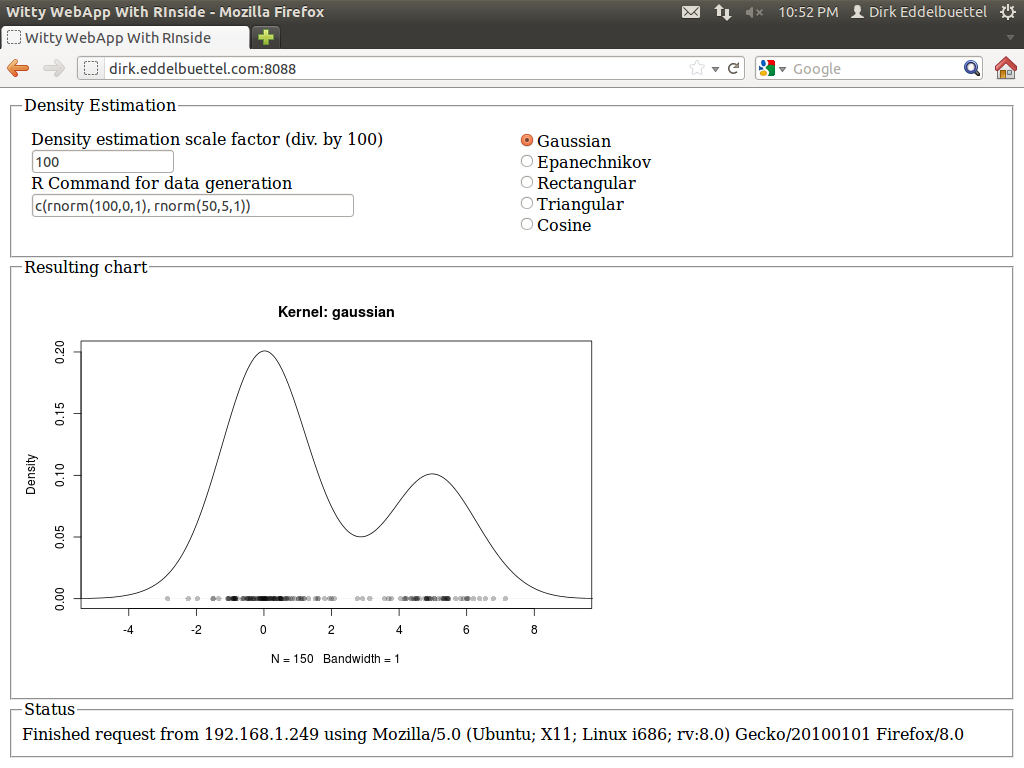
The example was simple yet powerful: a reimplementation of the standard GUI application of a standard density estimate. Here the user can pick a kernel density function from a selection, and also slide a bandwidth parameter. One nice addition was an entry field already populated with a simple expression for a mixture of Normals, allowing for arbitrary random distributions over which to estimate. The example is pretty (thanks to Qt), and was added to RInside with the last CRAN release 0.2.4. The blog post has a nice screenshot. I had long wondered how to do something similar 'on the web'. Web integration and application frameworks are of course a dime a dozen: Just about any language offers this, with more or less ease. But I wanted something simple yet powerful and fast. And I did not like the idea of a multi-tier app, or of a multi-language mix. I remember having seen something about a web-application framework not unlike Qt, and studying the very useful Wikipedia web application framework comparison I re-discovered Wt (pronounced "Witty"). So there it is, using C++ which brings us ample performance, the ability to connect to a number of libraries and applications (which is important in my quantitatively-minded workd) and avoid the whole multi-tier, multi-language combination. The Wt website has a few more good reason why this may be a suitable idea; the toolkit also offers a very decent amount of features and is amply documented with a fair number of examples. And after just a little bit poking around during two weekends, I now have the following webapp committed in the SVN repository of RInside, and it is all implemented in in less than two hundred (generously commented) lines of code.
It is currently up and running at the address shown in the screenshot, so give it a go (though I may take it down at another point in time). I quite like it: The application is responsive: changes in the radio buttons (for the density), or the bandwidth, each trigger reestimation of the density, and a new and updated chart is displayed immediately with no noticeable delay---just like the desktop application did. Best of all, the code logic is essentially unchanged from the Qt-based app. Signals and slots related events to actions, the layout is in terms of standard GUI boxen and containers. And best of all, I did not have to write a line of html, javascript, css or ajax: it is all handled by the Wt toolkit. I was able to drive the app from an Android phone, my tablet, various computers around the house, and had a few friends poke a stick at it from afar. There is at one open issue. Wt launches new instances of the application object with each connection, which is a very clean model. That doesn't map perfectly with R (which is single-threaded) and RInside (which runs as a singleton for the same reason). So right now, each action sends its state back to the client. In other words, each clients own its parameters and well as vector of random numbers. Each new action sends these back to the app which passes it to R, launches the re-estimation and gets an updated chart back which is then shown by the the client. That is not perfect, and maybe a forking model as used by Simon's RServe would be better, though it would require a rewrite of RInside. Not sure if we get there anytime soon. And for simple applications not facing legions of concurrent users, the singleton should still work. It's a proof of concept at this point. Feedback welcome, and RInside and Rcpp questions should go to the rcpp-devel list as usual. /code/snippets | permanent link Sat, 23 Apr 2011
Another nice Rcpp example
And I received a few friendly answers. My favourite, so far, was a suggestion by Lance Bachmeier who sent me a short script which used both R and C++ (via Rcpp) to simulate a first-order vector autoregressive process (and he ensured me that it worked well enough on his graduate students). It is indeed a great example as it involves (simple) matrix multiplication in an iterative fashion. Which makes it a great example not only for Rcpp but also for our RcppArmadillo package (which wraps Conrad Sanderson's wonderful Armadillo C++ templated library for linear algebra and more). And at the same time, we can also add another look at the new and shiny R compiler I also blogged about recently. So Lance and I iterated over this a little more over email, and I now added this as a new (and initial) example file in the RcppArmadillo SVN repo. (As an aside: The newest version 0.2.19 of RcppArmadillo has been sitting in incoming at CRAN since earlier in the week while the archive maintainer takes a well-deserved vacation. It should hit the public archive within a few days, and is otherwise available too from my site.) So let's walk through the example: This starts with a simple enough loop. After skipping the first row, each iteration multiplies the previous row with the parameters and adds error terms.R> ## parameter and error terms used throughout R> a <- matrix(c(0.5,0.1,0.1,0.5),nrow=2) R> e <- matrix(rnorm(10000),ncol=2) R> ## Let's start with the R version R> rSim <- function(coeff, errors) { + simdata <- matrix(0, nrow(errors), ncol(errors)) + for (row in 2:nrow(errors)) { + simdata[row,] = coeff %*% simdata[(row-1),] + errors[row,] + } + return(simdata) + } R> rData <- rSim(a, e) # generated by R We can then turn to the R compiler: Nice and easy: We load the compiler package, create a compiled function and use it. We check the results and surely enough find them to be identical.R> ## Now let's load the R compiler (requires R 2.13 or later) R> suppressMessages(require(compiler)) R> compRsim <- cmpfun(rSim) R> compRData <- compRsim(a,e) # generated by R 'compiled' R> stopifnot(all.equal(rData, compRData)) # checking results With that, time to turn to C++ using Armadillo via RcppArmadillo: Here we load the inline package to compile, link and load C++ snippets. We define a short C++ function in theR> ## Now load 'inline' to compile C++ code on the fly R> suppressMessages(require(inline)) R> code <- ' + arma::mat coeff = Rcpp::as<arma::mat>(a); + arma::mat errors = Rcpp::as<arma::mat>(e); + int m = errors.n_rows; int n = errors.n_cols; + arma::mat simdata(m,n); + simdata.row(0) = arma::zeros<arma::mat>(1,n); + for (int row=1; row<m; row++) { + simdata.row(row) = simdata.row(row-1)*trans(coeff)+errors.row(row); + } + return Rcpp::wrap(simdata); + ' R> ## create the compiled function R> rcppSim <- cxxfunction(signature(a="numeric",e="numeric"), + code,plugin="RcppArmadillo") R> rcppData <- rcppSim(a,e) # generated by C++ code R> stopifnot(all.equal(rData, rcppData)) # checking results code variable, declare a signature taking a and e as before and ask
cxxfunction() to deploy the plugin for RcppArmadillo so
that it and Rcpp are found during build. With that, we have a compiled function
to generate data, and we once again check the result. The C++ code is pretty straightforward as well. We can instatiate Armadillo matrices
directly from the R objects we pass down; we then run a similar loop building the result row by row.
Now, with all the build-up, here is the final timing comparison, using the rbenchmark package: So in a real-world example involving looping and some algebra (which is of course already done by BLAS and LAPACK libraries), the new R compiler improves by more than a factor of two, cutting time from 4.14 seconds down to about 2 seconds. Yet, this still leaves the C++ solution, clocking in at a mere 38 milliseconds, ahead by a factor of over fifty relative to the new R compilerR> ## now load the rbenchmark package and compare all three R> suppressMessages(library(rbenchmark)) R> res <- benchmark(rcppSim(a,e), + rSim(a,e), + compRsim(a,e), + columns=c("test", "replications", "elapsed", + "relative", "user.self", "sys.self"), + order="relative") R> print(res) test replications elapsed relative user.self sys.self 1 rcppSim(a, e) 100 0.038 1.0000 0.04 0 3 compRsim(a, e) 100 2.011 52.9211 2.01 0 2 rSim(a, e) 100 4.148 109.1579 4.14 0 And compared to just R itself, the simple solution involving Rcpp and RcppArmadillo is almost 110 times faster. As I mentioned, I quite like this example ;-). /code/snippets | permanent link Fri, 25 Mar 2011
R inside Qt: A simple RInside application
Beginning users sometimes ask about how to use RInside inside larger projects. And as I had meant to experiment with embedding inside of the powerful Qt framework anyway, I started to dabble a little. A first result is now in the SVN sources of RInside.
My starting point was the classic
The problem I addressed first was actual buildability. For the RInside examples, Romain and I provide a Makefile that just works by making calls to R itself to learn about flags for R, Rcpp and RInside such that all required headers and libraries are found. That is actually relatively straightforward (and documented in our vignettes) but a little intimidating at first---which is why a ready-made Makefile is a good thing.
Qt of course uses The double dollar signs and escaping of parentheses are a little tedious, but hey it works and expands the compiler and linker flags such that everything## -*- mode: Makefile; c-indent-level: 4; c-basic-offset: 4; tab-width: 8; -*- ## ## Qt usage example for RInside, inspired by the standard 'density ## sliders' example for other GUI toolkits ## ## Copyright (C) 2011 Dirk Eddelbuettel and Romain Francois TEMPLATE = app HEADERS = qtdensity.h SOURCES = qtdensity.cpp main.cpp QT += svg ## comment this out if you need a different version of R, ## and set set R_HOME accordingly as an environment variable R_HOME = $$system(R RHOME) ## include headers and libraries for R RCPPFLAGS = $$system($$R_HOME/bin/R CMD config --cppflags) RLDFLAGS = $$system($$R_HOME/bin/R CMD config --ldflags) RBLAS = $$system($$R_HOME/bin/R CMD config BLAS_LIBS) RLAPACK = $$system($$R_HOME/bin/R CMD config LAPACK_LIBS) ## if you need to set an rpath to R itself, also uncomment #RRPATH = -Wl,-rpath,$$R_HOME/lib ## include headers and libraries for Rcpp interface classes RCPPINCL = $$system($$R_HOME/bin/Rscript -e \'Rcpp:::CxxFlags\(\)\') RCPPLIBS = $$system($$R_HOME/bin/Rscript -e \'Rcpp:::LdFlags\(\)\') ## for some reason when building with Qt we get this each time ## so we turn unused parameter warnings off RCPPWARNING = -Wno-unused-parameter ## include headers and libraries for RInside embedding classes RINSIDEINCL = $$system($$R_HOME/bin/Rscript -e \'RInside:::CxxFlags\(\)\') RINSIDELIBS = $$system($$R_HOME/bin/Rscript -e \'RInside:::LdFlags\(\)\') ## compiler etc settings used in default make rules QMAKE_CXXFLAGS += $$RCPPWARNING $$RCPPFLAGS $$RCPPINCL $$RINSIDEINCL QMAKE_LFLAGS += $$RLDFLAGS $$RBLAS $$RLAPACK $$RCPPLIBS $$RINSIDELIBS ## addition clean targets QMAKE_CLEAN += qtdensity Makefile
The code itself is pretty straightforward too. We instantiate the
RInside object
as well as the main Qt application
object. We then instantiate a new object of class // -*- mode: C++; c-indent-level: 4; c-basic-offset: 4; tab-width: 8; -*- // // Qt usage example for RInside, inspired by the standard 'density // sliders' example for other GUI toolkits // // Copyright (C) 2011 Dirk Eddelbuettel and Romain Francois #include <QApplication> #include "qtdensity.h" int main(int argc, char *argv[]) { RInside R(argc, argv); // create an embedded R instance QApplication app(argc, argv); QtDensity qtdensity(R); return app.exec(); } The definition of the main object is pretty simple: a few private variables, and a few functions to interact with the GUI and get values from the radio buttons, slider or input field---as well as functions to update the chart or re-draw the random variables. // -*- mode: C++; c-indent-level: 4; c-basic-offset: 4; tab-width: 8; -*- // // Qt usage example for RInside, inspired by the standard 'density // sliders' example for other GUI toolkits // // Copyright (C) 2011 Dirk Eddelbuettel and Romain Francois #ifndef QTDENSITY_H #define QTDENSITY_H #include <RInside.h> #include <QMainWindow> #include <QHBoxLayout> #include <QSlider> #include <QSpinBox> #include <QLabel> #include <QTemporaryFile> #include <QSvgWidget> class QtDensity : public QMainWindow { Q_OBJECT public: QtDensity(RInside & R); private slots: void getBandwidth(int bw); void getKernel(int kernel); void getRandomDataCmd(QString txt); void runRandomDataCmd(void); private: void setupDisplay(void); // standard GUI boilderplate of arranging things void plot(void); // run a density plot in R and update the void filterFile(void); // modify the richer SVG produced by R QSvgWidget *m_svg; // the SVG device RInside & m_R; // reference to the R instance passed to constructor QString m_tempfile; // name of file used by R for plots QString m_svgfile; // another temp file, this time from Qt int m_bw, m_kernel; // parameters used to estimate the density QString m_cmd; // random draw command string }; #endif
Lastly, no big magic in the code either (apart from the standard magic provided
by RInside). A bit of standard GUI layouting, and
then some functions to pick values from the inputs as well as to compute /
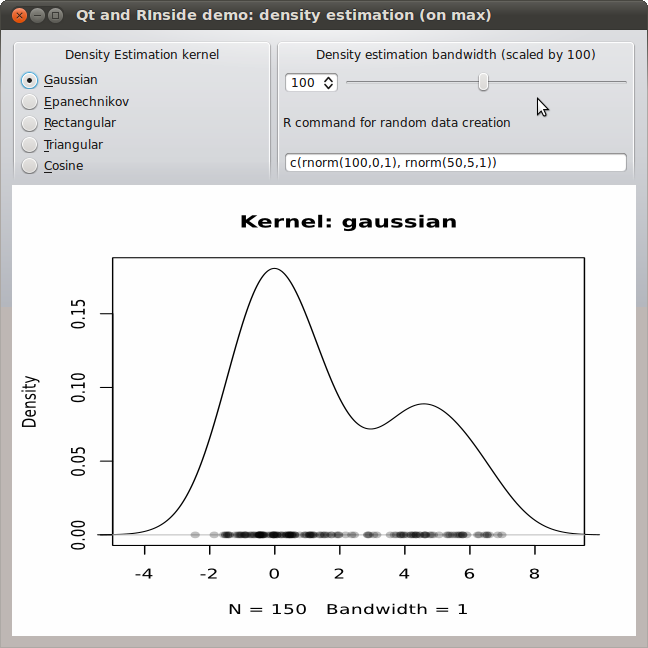
update the output. One issue is worth mentioning. The screenshot and code
show the second version of this little application. I built a first one using
a standard portable network graphics (png) file. That was fine, but not
crisp as png is a pixel format so I went back and
experimented with scalable vector graphics (svg) instead. One can create svg output with
R in a number of ways, one of
which is the
cairoDevice
package by Michael Lawrence (who also wrote
RGtk2 and good
chunks of Ggobi). Now, it turns out that
Qt displays the so-called SVG
tiny standard whereas
R creates a fuller SVG format. Some
discussion with Michael reveals that one can modify the svg file suitably (which
is what the function // -*- mode: C++; c-indent-level: 4; c-basic-offset: 4; tab-width: 8; -*- // // Qt usage example for RInside, inspired by the standard 'density // sliders' example for other GUI toolkits -- this time with SVG // // Copyright (C) 2011 Dirk Eddelbuettel and Romain Francois #include <QtGui> #include "qtdensity.h" QtDensity::QtDensity(RInside & R) : m_R(R) { m_bw = 100; // initial bandwidth, will be scaled by 100 so 1.0 m_kernel = 0; // initial kernel: gaussian m_cmd = "c(rnorm(100,0,1), rnorm(50,5,1))"; // simple mixture m_R["bw"] = m_bw; // pass bandwidth to R, and have R compute a temp.file name m_tempfile = QString::fromStdString(Rcpp::as<std::string>(m_R.parseEval("tfile <- tempfile()"))); m_svgfile = QString::fromStdString(Rcpp::as<std::string>(m_R.parseEval("sfile <- tempfile()"))); m_R.parseEvalQ("library(cairoDevice)"); setupDisplay(); } void QtDensity::setupDisplay(void) { QWidget *window = new QWidget; window->setWindowTitle("Qt and RInside demo: density estimation"); QSpinBox *spinBox = new QSpinBox; QSlider *slider = new QSlider(Qt::Horizontal); spinBox->setRange(5, 200); slider->setRange(5, 200); QObject::connect(spinBox, SIGNAL(valueChanged(int)), slider, SLOT(setValue(int))); QObject::connect(slider, SIGNAL(valueChanged(int)), spinBox, SLOT(setValue(int))); spinBox->setValue(m_bw); QObject::connect(spinBox, SIGNAL(valueChanged(int)), this, SLOT(getBandwidth(int))); QLabel *cmdLabel = new QLabel("R command for random data creation"); QLineEdit *cmdEntry = new QLineEdit(m_cmd); QObject::connect(cmdEntry, SIGNAL(textEdited(QString)), this, SLOT(getRandomDataCmd(QString))); QObject::connect(cmdEntry, SIGNAL(editingFinished()), this, SLOT(runRandomDataCmd())); QGroupBox *kernelRadioBox = new QGroupBox("Density Estimation kernel"); QRadioButton *radio1 = new QRadioButton("&Gaussian"); QRadioButton *radio2 = new QRadioButton("&Epanechnikov"); QRadioButton *radio3 = new QRadioButton("&Rectangular"); QRadioButton *radio4 = new QRadioButton("&Triangular"); QRadioButton *radio5 = new QRadioButton("&Cosine"); radio1->setChecked(true); QVBoxLayout *vbox = new QVBoxLayout; vbox->addWidget(radio1); vbox->addWidget(radio2); vbox->addWidget(radio3); vbox->addWidget(radio4); vbox->addWidget(radio5); kernelRadioBox->setMinimumSize(260,140); kernelRadioBox->setMaximumSize(260,140); kernelRadioBox->setSizePolicy(QSizePolicy::Fixed, QSizePolicy::Fixed); kernelRadioBox->setLayout(vbox); QButtonGroup *kernelGroup = new QButtonGroup; kernelGroup->addButton(radio1, 0); kernelGroup->addButton(radio2, 1); kernelGroup->addButton(radio3, 2); kernelGroup->addButton(radio4, 3); kernelGroup->addButton(radio5, 4); QObject::connect(kernelGroup, SIGNAL(buttonClicked(int)), this, SLOT(getKernel(int))); m_svg = new QSvgWidget(); runRandomDataCmd(); // also calls plot() QGroupBox *estimationBox = new QGroupBox("Density estimation bandwidth (scaled by 100)"); QHBoxLayout *spinners = new QHBoxLayout; spinners->addWidget(spinBox); spinners->addWidget(slider); QVBoxLayout *topright = new QVBoxLayout; topright->addLayout(spinners); topright->addWidget(cmdLabel); topright->addWidget(cmdEntry); estimationBox->setMinimumSize(360,140); estimationBox->setMaximumSize(360,140); estimationBox->setSizePolicy(QSizePolicy::Fixed, QSizePolicy::Fixed); estimationBox->setLayout(topright); QHBoxLayout *upperlayout = new QHBoxLayout; upperlayout->addWidget(kernelRadioBox); upperlayout->addWidget(estimationBox); QHBoxLayout *svglayout = new QHBoxLayout; svglayout->addWidget(m_svg); QVBoxLayout *outer = new QVBoxLayout; outer->addLayout(upperlayout); outer->addLayout(svglayout); window->setLayout(outer); window->show(); } void QtDensity::plot(void) { const char *kernelstrings[] = { "gaussian", "epanechnikov", "rectangular", "triangular", "cosine" }; m_R["bw"] = m_bw; m_R["kernel"] = kernelstrings[m_kernel]; // that passes the string to R std::string cmd1 = "Cairo(width=6,height=6,pointsize=10,surface='svg',filename=tfile); " "plot(density(y, bw=bw/100, kernel=kernel), xlim=range(y)+c(-2,2), main=\"Kernel: "; std::string cmd2 = "\"); points(y, rep(0, length(y)), pch=16, col=rgb(0,0,0,1/4)); dev.off()"; std::string cmd = cmd1 + kernelstrings[m_kernel] + cmd2; // stick the selected kernel in the middle m_R.parseEvalQ(cmd); filterFile(); // we need to simplify the svg file for display by Qt m_svg->load(m_svgfile); } void QtDensity::getBandwidth(int bw) { if (bw != m_bw) { m_bw = bw; plot(); } } void QtDensity::getKernel(int kernel) { if (kernel != m_kernel) { m_kernel = kernel; plot(); } } void QtDensity::getRandomDataCmd(QString txt) { m_cmd = txt; } void QtDensity::runRandomDataCmd(void) { std::string cmd = "y <- " + m_cmd.toStdString(); m_R.parseEvalQ(cmd); plot(); // after each random draw, update plot with estimate } void QtDensity::filterFile() { // cairoDevice creates richer SVG than Qt can display // but per Michaele Lawrence, a simple trick is to s/symbol/g/ which we do here QFile infile(m_tempfile); infile.open(QFile::ReadOnly); QFile outfile(m_svgfile); outfile.open(QFile::WriteOnly | QFile::Truncate); QTextStream in(&infile); QTextStream out(&outfile); QRegExp rx1("<symbol"); QRegExp rx2("</symbol"); while (!in.atEnd()) { QString line = in.readLine(); line.replace(rx1, "<g"); // so '<symbol' becomes '<g ...' line.replace(rx2, "</g");// and '</symbol becomes '</g' out << line << "\n"; } infile.close(); outfile.close(); } What the little application does is actually somewhat neat for the few lines. One key features is that the generated data can be specified directly by an R expression which allows for mixtures (as shown, and as is the default). With that it easy to see how many points are needed in the second hump to make the estimate multi-modal, and how much of a distance between both centers is needed and so on. Obviously, the effect of the chosen kernel and bandwidth can also be visualized. And with the chart the being a support vector graphics display, we can resize and scale at will and it still looks crisp. The code (for both the simpler png variant and the svg version shown here) is in the SVN repository for RInside and will be in the next release. Special thanks to Michael Lawrence for patiently working through some svg woes with me over a few emails.
Update: Some typos fixed. Update 2: Two URLs corrected. /code/snippets | permanent link Sun, 23 Jan 2011
CRANberries is now tweeting
For the technically minded, adding this to the existing 200-line program which runs all of CRANberries was very easy. CRANberries relies only on R itself and a few Unix tools like diffstat as well as the simple blosxom txt-to-html/rss 'blog compiler'. The tweeting itself is now done by this new function which simply pipes the message in Greg KH's bti program (which is now a new dependency). Special thanks to its Debian maintainer Gregor Herrmann for some helpful emails; I am using the newest release 0.29 which itself needs liboauth0. Once OAuth tokens are set-up (and see here for how to do that) all we need is the three-liner above.tweetNewBlogEntry <- function(curPkg, curVer, reposurl) { ## tests reveal that pipe(), cat(), close() is easiest ## to send multiple messages, may need --background option con <- pipe("bti --config bti.conf", "w") cat("New CRAN package", curPkg, "with initial version", curVer, " http://goo.gl/pgljT\n", file=con) close(con) } At this point I am not too sure what to do about updated packages. One message per updated package seems too noisy. To be seen---comments or suggestions welcome. /code/snippets | permanent link Mon, 17 Jan 2011
Keeping simple things simple
It is a fine article motivated by all the usual reasons that are e.g. mentioned in the Google Tech Talk which Romain and I gave last October about our work around Rcpp. But it is just not simple. Allow me to explain. When Jeff showed this C language file and then needs several paragraphs to explain what is going on, what is needed to compile and then how to load it --- I simply could not resist. Almost immediately, I emailed back to him something as simple as this using both our Rcpp package as well as the wonderful inline package by Oleg which Romain and I more or less adopted:#include <R.h> #include <Rinternals.h> SEXP esoteric_rev (SEXP x) { SEXP res; int i, r, P=0; PROTECT(res = allocVector(REALSXP, length(x))); P++; for(i=length(x), r=0; i>0; i--, r++) { REAL(res)[r] = REAL(x)[i-1]; } copyMostAttrib(x, res); UNPROTECT(P); return res; } Here we load inline, and then define a three-line C++ program using facilities from our Rcpp package. All we need to revert a vector is to first access its R object in C++ by instantiating the R vector as alibrary(inline) ## for cxxfunction() src <- 'Rcpp::NumericVector x = Rcpp::NumericVector(xs); std::reverse(x.begin(), x.end()); return(x);' fun <- cxxfunction(signature(xs="numeric"), body=src, plugin="Rcpp") fun( seq(0, 1, 0.1) ) NumericVector.
These C++ classes then provide iterators which are compatible with the
Standard Template Library (STL). So we simply
call the STL function reverse pointing the beginning and end
of the vector, and are done! Rcpp then allows us the return the C++ vector
which it turns into an R vector. Efficient in-place reversal, just like Jeff
had motivated, in three lines. Best of all, we can execute this from within R itself:
R> library(inline) ## for cxxfunction() R> src <- 'Rcpp::NumericVector x = Rcpp::NumericVector(xs); + std::reverse(x.begin(), x.end()); + return(x);' R> fun <- cxxfunction(signature(xs="numeric"), body=src, plugin="Rcpp") R> fun( seq(0, 1, 0.1) ) [1] 1.0 0.9 0.8 0.7 0.6 0.5 0.4 0.3 0.2 0.1 0.0 R>
Lastly, Jeff shows a more complete example wherein a new vector is created,
and any potential attributes are copied as well. Naturally, we can do that
too. First, we used Both theR> library(inline) R> src <- 'Rcpp::NumericVector x = Rcpp::clone<Rcpp::NumericVector>(xs); + std::reverse(x.begin(), x.end()); + ::Rf_copyMostAttrib(xs, x); + return(x);' R> fun <- cxxfunction(signature(xs="numeric"), body=src, plugin="Rcpp") R> obj <- structure(seq(0, 1, 0.1), obligatory="hello, world!") R> fun(obj) [1] 1.0 0.9 0.8 0.7 0.6 0.5 0.4 0.3 0.2 0.1 0.0 attr(,"obligatory") [1] "hello, world!" R> obj [1] 0.0 0.1 0.2 0.3 0.4 0.5 0.6 0.7 0.8 0.9 1.0 attr(,"obligatory") [1] "hello, world!" R> obj variable and the new copy contain the desired data
attribute, the new copy is reversed, the original is untouched---and all in
four lines of C++ called via one
inline call. I have
now been going on for over one hundred lines yet I never had to mention
memory management, pointers, PROTECT or other components of the
R API for C. Hopefully, this short writeup provided an idea of why
Romain and I think
Rcpp is the way to
go for creating C/C++ functions for extending and enhancing
R.
/code/snippets | permanent link Sun, 16 Jan 2011
Plotting overbought / oversold regions in R
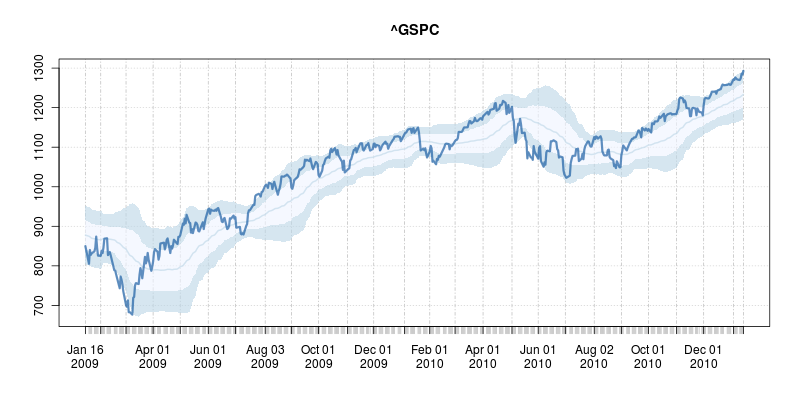
Classifying markets as overbought or oversold is a popular heuristic. It starts from computing a rolling smoothed estimate of the prices, usually via a (exponential or standard) moving average over a suitable number of days (where Bespoke uses 50 days, see here). This is typically coupled with a (simple) rolling standard deviation. Overbought and oversold regions are then constructed by taking the smoothed mean plus/minus one and two standard deviations. Doing this is in R is pretty easy thanks to the combination of R's rich base functions and its add-on packages from CRAN. Below is a simply function I wrote a couple of months ago---and I figured I might as well release. It relies on the powerful packages quantmod and TTR by my pals Jeff Ryan and Josh Ulrich, respectively.
## plotOBOS -- displaying overbough/oversold as eg in Bespoke's plots ## ## Copyright (C) 2010 - 2011 Dirk Eddelbuettel ## ## This is free software: you can redistribute it and/or modify it ## under the terms of the GNU General Public License as published by ## the Free Software Foundation, either version 2 of the License, or ## (at your option) any later version. suppressMessages(library(quantmod)) # for getSymbols(), brings in xts too suppressMessages(library(TTR)) # for various moving averages plotOBOS <- function(symbol, n=50, type=c("sma", "ema", "zlema"), years=1, blue=TRUE) { today <- Sys.Date() X <- getSymbols(symbol, src="yahoo", from=format(today-365*years-2*n), auto.assign=FALSE) x <- X[,6] # use Adjusted type <- match.arg(type) xd <- switch(type, # compute xd as the central location via selected MA smoother sma = SMA(x,n), ema = EMA(x,n), zlema = ZLEMA(x,n)) xv <- runSD(x, n) # compute xv as the rolling volatility strt <- paste(format(today-365*years), "::", sep="") x <- x[strt] # subset plotting range using xts' nice functionality xd <- xd[strt] xv <- xv[strt] xyd <- xy.coords(.index(xd),xd[,1]) # xy coordinates for direct plot commands xyv <- xy.coords(.index(xv),xv[,1]) n <- length(xyd$x) xx <- xyd$x[c(1,1:n,n:1)] # for polygon(): from first point to last and back if (blue) { blues5 <- c("#EFF3FF", "#BDD7E7", "#6BAED6", "#3182BD", "#08519C") # cf brewer.pal(5, "Blues") fairlylight <- rgb(189/255, 215/255, 231/255, alpha=0.625) # aka blues5[2] verylight <- rgb(239/255, 243/255, 255/255, alpha=0.625) # aka blues5[1] dark <- rgb(8/255, 81/255, 156/255, alpha=0.625) # aka blues5[5] } else { fairlylight <- rgb(204/255, 204/255, 204/255, alpha=0.5) # grays with alpha-blending at 50% verylight <- rgb(242/255, 242/255, 242/255, alpha=0.5) dark <- 'black' } plot(x, ylim=range(range(xd+2*xv, xd-2*xv, na.rm=TRUE)), main=symbol, col=fairlylight) # basic xts plot polygon(x=xx, y=c(xyd$y[1]+xyv$y[1], xyd$y+2*xyv$y, rev(xyd$y+xyv$y)), border=NA, col=fairlylight) # upper polygon(x=xx, y=c(xyd$y[1]-1*xyv$y[1], xyd$y+1*xyv$y, rev(xyd$y-1*xyv$y)), border=NA, col=verylight)# center polygon(x=xx, y=c(xyd$y[1]-xyv$y[1], xyd$y-2*xyv$y, rev(xyd$y-xyv$y)), border=NA, col=fairlylight) # lower lines(xd, lwd=2, col=fairlylight) # central smooted location lines(x, lwd=3, col=dark) # actual price, thicker invisible(NULL) } After downloading data and computing the rolling smoothed mean and standard deviation, it really is just a matter of plotting (appropriate) filled polygons. Here I used colors from the neat RColorBrewer package with some alpha blending. Colors can be turned off via an option to the function; ranges, data length and type of smoother can also be picked.
To call this in R, simply source the file and the call, say,
This shows the market did indeed bounce off the oversold lows nicely on a few occassions in 2009 and 2010 --- but also continued to slide after hitting the condition. Nothing is foolproof, and certainly nothing as simple as this is, so buyer beware. But it may prove useful in conjunction with other tools. The code for the script is here and of course available under GPL 2 or later. I'd be happy to help incorporate it into some other finance package. Lastly, if you read this post this far, also consider our R / Finance conference coming at the end of April.
Edit: Corrected several typos with thanks to Josh. /code/snippets | permanent link |
|||||